If you’re searching “Timemore scale review,” you’re probably trying to answer one practical question: will a Timemore coffee scale make brewing easier and more repeatable—or will it add small daily annoyances? And if you’re comparing options for an espresso electric scale, the “right” pick usually comes down to fit, readability, and how painless taring/timing feels mid-shot.
Most Timemore scales land in the same sweet spot: 0.1 g resolution, up to 2,000 g, and USB-C charging—then they diverge on the details that change your brew. The Nano goes compact for espresso trays, the DUO leans into pour-over insight with dual measurements, and the newer Black Mirror variants tweak modes and power behavior. This review breaks down what those differences feel like in daily use.

Quick verdict: Timemore is a strong value if you pick the right size (clearance) and the right controls (how you tare/time). Most “bad” experiences come from buying a model that doesn’t fit the station—or feels annoying mid-brew.
Timemore Black Mirror, Nano, and DUO in one minute
The best Timemore scale is the one that disappears into your routine: readable, fast, and easy to tare. Most people buy a Black Mirror for value, then either love it… or realize they picked the wrong size/mode set for their setup.
Think of it like this: Black Mirror variants are all-rounders, Nano is espresso-first compact, and DUO is for people who want more feedback during pour-over (and don’t mind learning a couple of modes). If you can only do one thing before buying, do the clearance check—it prevents most regrets.
The lineup (and who each fits)
Black Mirror / Plus / Basic Pro: mixed brewing when you have space under a cup/server. Nano: cramped espresso trays and quick-glance readability. DUO: pour-over pacing and extra brewing feedback. Mini/travel models: small footprint first, fewer “smart” options second.
The three dealbreakers to check before buying
Clearance: measure drip-tray space (scale + tallest cup). Mode friction: if you hate tap-dancing, choose the simplest model you can live with. Spill risk: if your station runs wet, prioritize protection and easy cleaning over “one more feature.”
Ergonomics and controls (what you notice every day)
Ergonomics beats specs because you use a scale while multitasking—pouring, watching flow, adjusting grind, cleaning. A scale can be “accurate” and still feel irritating if the display is hard to see or the controls misfire when your fingers are damp.
If you brew espresso daily, the Nano’s big advantage is visibility at low angles. Reviewers specifically call out how much the Nano angled display helps when your portafilter and cup block your view—meaning fewer awkward crouches and fewer “did I just miss my yield?” moments.
Display readability and viewing angle
For pour-over, you’re usually looking down from above—so a bigger readout is king. For espresso, you’re peeking from the side—so an angled face can save you mid-shot. Either way, the test is simple: “Can I read it without moving my hands?” If not, it’s the wrong scale for your station.
Buttons, touch controls, and mis-press prevention
Touch controls look clean but can get fussy with damp fingers. Physical buttons are predictable, but placement matters on compact models. The best setup lets you tare and start/stop without taking your eyes off the stream.
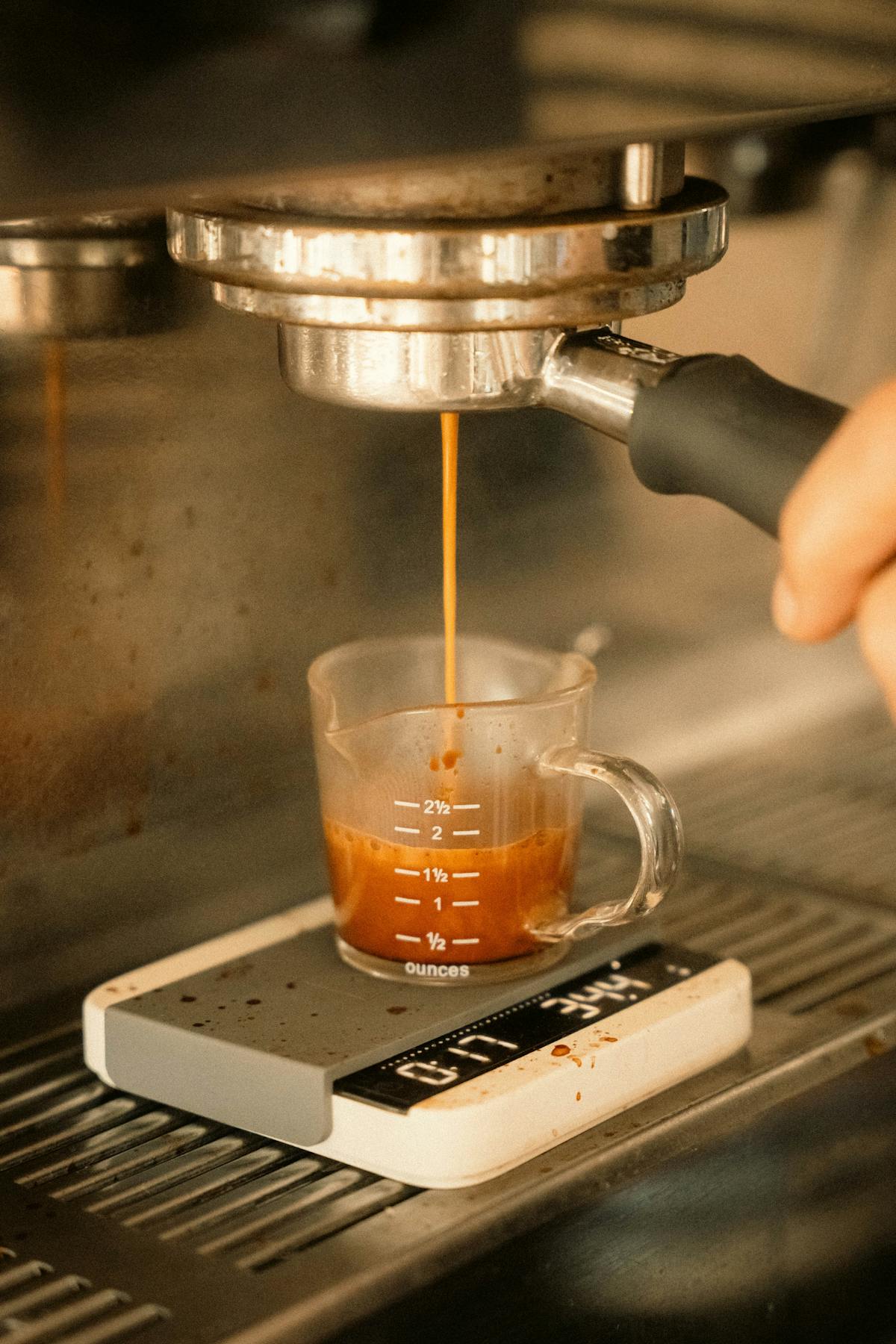
Real-life fit check: If your cup barely clears your portafilter, you’ll value a smaller footprint more than extra modes. Make sure you can still see the numbers while the shot runs—otherwise the scale turns into “set-and-forget,” which defeats the point.
Tip: Put your tallest cup on the tray with the scale underneath and measure remaining space. One measurement prevents most “wrong scale” purchases.
Speed and accuracy in real brewing
In practice, “accuracy” means repeatability and response time. If the display lags, you pour past your target. If it jitters, you second-guess your dose. A good scale feels steady and immediate.
Look for consistent behavior: small additions register quickly, and the reading doesn’t drift during a brew. Reviews that include simple checks—repeat measurements and sensitivity notes—help here, including Comori’s hands-on accuracy checks that translate well to day-to-day brewing (not just spec sheets).
Repeatability tests you can do in five minutes
Coin test: place the same coin or small weight 10 times; the result should settle quickly and match. Corner test: place the object near each corner; big differences suggest uneven load handling. Micro-add test: add water in tiny pulses (teaspoon-ish) to see if the scale “catches up” smoothly.
When 0.1 g is enough—and when it isn’t
For pour-over, 0.1 g is plenty because your pours move in larger steps. For espresso, 0.1 g is still practical for shot yield (especially if you target a range like 36–40 g), but readability + controls matter more than extra digits. If you’re dialing espresso all day and need ultra-fast, ultra-stable response, that’s where premium scales justify the cost.
Modes you’ll actually use
Modes are only features if you use them without thinking. If a mode requires a tap sequence you can’t remember mid-brew, you’ll default to manual timing and wonder why you paid for “smart” anything.
If you’re eyeing the DUO, it’s aimed at richer feedback during brewing—especially pour-over—not just “a cheaper scale.” Pull & Pour’s DUO dual-sensor overview is useful for understanding what you gain (and whether you’ll use it).
The rule of thumb: buy the model whose manual mode you’d happily use forever. Then treat auto features as a convenience—not the core reason you purchase.
Espresso workflows: what “auto” should really do
A good espresso workflow is boring: tare the cup, start the shot, watch the number climb. Auto-timer is nice when it starts reliably at first drip, but don’t buy a scale solely for auto timing. Buy for fit, visibility, and predictable controls—then let “auto” be a bonus.
Pour-over workflows: pacing beats timing
For pour-over, the timer helps, but pacing is the bigger win: staying on schedule with intermediate targets (e.g., “60 g bloom,” “200 g by 1:15,” “final weight by 2:30”). Choose the scale that lets you hit those targets smoothly—without lag or surprise resets.
Best rule: Pick the model whose manual mode you’d happily use forever—then any “smart” mode is just gravy.
Workflow-first buying test
Durability, charging, and spill reality
Scales live in the splash zone: steam, stray drops, wet towels, coffee oils. You don’t need a waterproof brick—but you do need a scale that’s easy to protect and easy to clean.
Don’t assume “water resistant” means “spill proof.” Coffee Chronicler’s Black Mirror review explains the practical limitations and why you should still treat spills as urgent—see Black Mirror scale verdict. Translation: minor splashes might be fine, but puddles and charging while damp are where things go sideways.
USB-C, battery habits, and auto-off behavior
USB-C is convenient, but placement matters: exposed ports near puddles are a risk. If your station runs wet, charge away from the sink and avoid leaving the cable connected while brewing. Auto-off timers help battery life but can annoy long brews—so if you do slow recipes, confirm your model doesn’t time out too aggressively.
Mats, ports, and the safest way to clean
Use a silicone mat if your model includes one (or add a thin third-party mat) to reduce heat and water exposure. For cleaning, skip the soaked rag: use a barely damp cloth, then dry immediately. A quick wipe after each brew also prevents coffee oils from building up and making surfaces feel “sticky.”
Spill protocol: If you spill water or coffee, lift the scale immediately, wipe the surface, and let it air-dry fully before charging. Charging a damp device is where “small splash” becomes “dead scale.”
Which Timemore scale should you buy?
Your best pick comes down to two questions: “Will it fit?” and “Will I enjoy using it?” Pour-over-only brewers can prioritize stability and readability. Espresso-first brewers should prioritize footprint, viewing angle, and easy taring mid-shot.
If you landed here from a search like best espresso scale reddit, use the table and matrix below as a quick filter: pick the model that matches your tray clearance and your tolerance for mode complexity—then worry about extras.
If you’re considering the Nano, start with stated size and capacity so you don’t guess on tray clearance; Timemore’s product page lists key numbers under official Nano specs.
Best picks by use case
Espresso-first, tight tray: Nano (or a similarly compact Timemore variant). Mixed brewing, one scale for everything: a standard Black Mirror/Plus/Basic Pro style model. Pour-over nerd mode: DUO if you’ll actually use the extra feedback. Travel / minimalist kit: a small footprint model—accept fewer “smart” extras.
When to skip Timemore (and what to consider instead)
Skip Timemore if you need a scale with bluetooth for app logging, if you’re pairing your setup with a bluetooth espresso machine, or if you’re shopping the app-driven ecosystem people often search as decent scale. In those cases, premium options (often at several times the price) can make more sense. If you want repeatable home coffee with less fuss, Timemore’s value is strong—just buy the right form factor.
Mobile tip: If the comparison table looks cut off, swipe horizontally to see all columns.
| Model vibe | Best for | Watch-outs | Buyer shortcut |
|---|---|---|---|
| Black Mirror family | One scale for pour-over + espresso | Mode friction varies by version | Choose this if you brew “a bit of everything.” |
| Nano | Espresso trays and low-angle reading | Smaller surface can feel cramped | Choose this if clearance is your #1 constraint. |
| DUO | Pour-over pacing and richer feedback | Extra features mean extra learning | Choose this if you love recipes and data. |
Buy if
- Workflow: you want fast taring, clear numbers, repeatable recipes.
- Space: you’ve measured tray/counter space and know it fits.
- Habits: you’ll use weight + time every brew (not “sometimes”).
- Value: you’d rather spend on grinder/beans than a premium scale.
Avoid if
- Spills: your station is routinely wet and you need true waterproofing.
- Speed: you’re dialing espresso all day and can’t tolerate any lag.
- Apps: you specifically want a bluetooth coffee scale for logging and recipe tracking.
- Simplicity: you get irritated by modes and want one-button operation.
Printable decision matrix: Enter scores 0–3 in each cell (0 = dealbreaker, 3 = perfect). Add each column to pick your best fit.
Keyboard tip: Tab into a cell, type a number, then Tab to the next cell.
| Priority | Black Mirror | Nano | DUO |
|---|---|---|---|
| Fit & clearance (0–3) | |||
| Readability (0–3) | |||
| Control simplicity (0–3) | |||
| Brewing feedback (0–3) | |||
| Spill tolerance (0–3) | |||
| Total (add) |
Bottom line: Timemore scales are a smart buy when you pick the right footprint and controls for your brew style. Choose by fit and readability first; let “smart” features be a bonus.